Every feature, mapped to a workflow you actually have.
End-to-end encrypted remote control across 11 CLI agents. Cost attribution that names the rogue session. Session memory that survives a closed laptop. Team governance for orgs that need it.
Security and Encryption
Your code never leaves your machine in plaintext. Even if our database were stolen tonight.
End-to-End Encryption
Your prompts and your code get encrypted on your machine, with TweetNaCl, before anything leaves. Styrby only ever sees ciphertext. So your IP stays your IP, even when our servers are doing the relay.
Public/private keypair generated locally. Keys never leave the device.
Zero-Knowledge Architecture
Our servers process metadata only: timestamps, token counts, cost calculations, connection status. We genuinely cannot read your data, even if a court compelled us to. The architecture forecloses the question.
Even if our database were stolen tonight, your code is unreadable ciphertext.
API Key Hashing
Your API keys are hashed with bcrypt at rest. We never store the plaintext credential. Rate limiting on every endpoint kills brute-force attempts before they get traction.
Per-endpoint rate limits with graduated backoff.
Audit Trail
Every permission approval, budget change, team action, and security event lands in a tamper-evident log with timestamp and actor. Export it directly for internal compliance reviews or incident forensics.
Tamper-evident logging with row-level security.
Remote Agent Control
Approve commands, set guardrails, and revoke access from anywhere with cell signal.
Permission Approval
When the agent wants to write a file, run a shell command, or hit an API, it pauses and pings your phone. The push includes the diff, the command, and a risk badge (Low to Critical). One tap to approve or deny.
Works from your phone, tablet, or any browser.
Control From Anywhere
Leave your desk for a meeting. Go to lunch. Walk the dog. Catch a flight. Your agents keep working, and the dashboard, the approvals, and the cost panel all follow you in your pocket.
iOS app launching soon. Responsive web dashboard works on any browser today.
Auto-Approve Rules
Whitelist the low-risk actions you trust the agent to handle (read-only file ops, package installs, test runs). Keep the approval gate on the dangerous ones (file deletions, shell commands, network calls). Per-agent, per-tool.
Per-agent, per-tool granularity.
Blocked Tool Lists
Explicitly forbid the agent from touching certain tools or commands. rm -rf, database drops, production deploys, anything. The agent gets a clear denial and moves on instead of finding a creative workaround.
Configurable per agent type.
Offline Command Queue
Drop into a tunnel, board a plane, lose Wi-Fi at the cafe. Approvals and commands queue locally and sync the moment you reconnect. Nothing is lost. The agent does not silently miss your tap.
Local queue with automatic sync on reconnection.
Cost Management
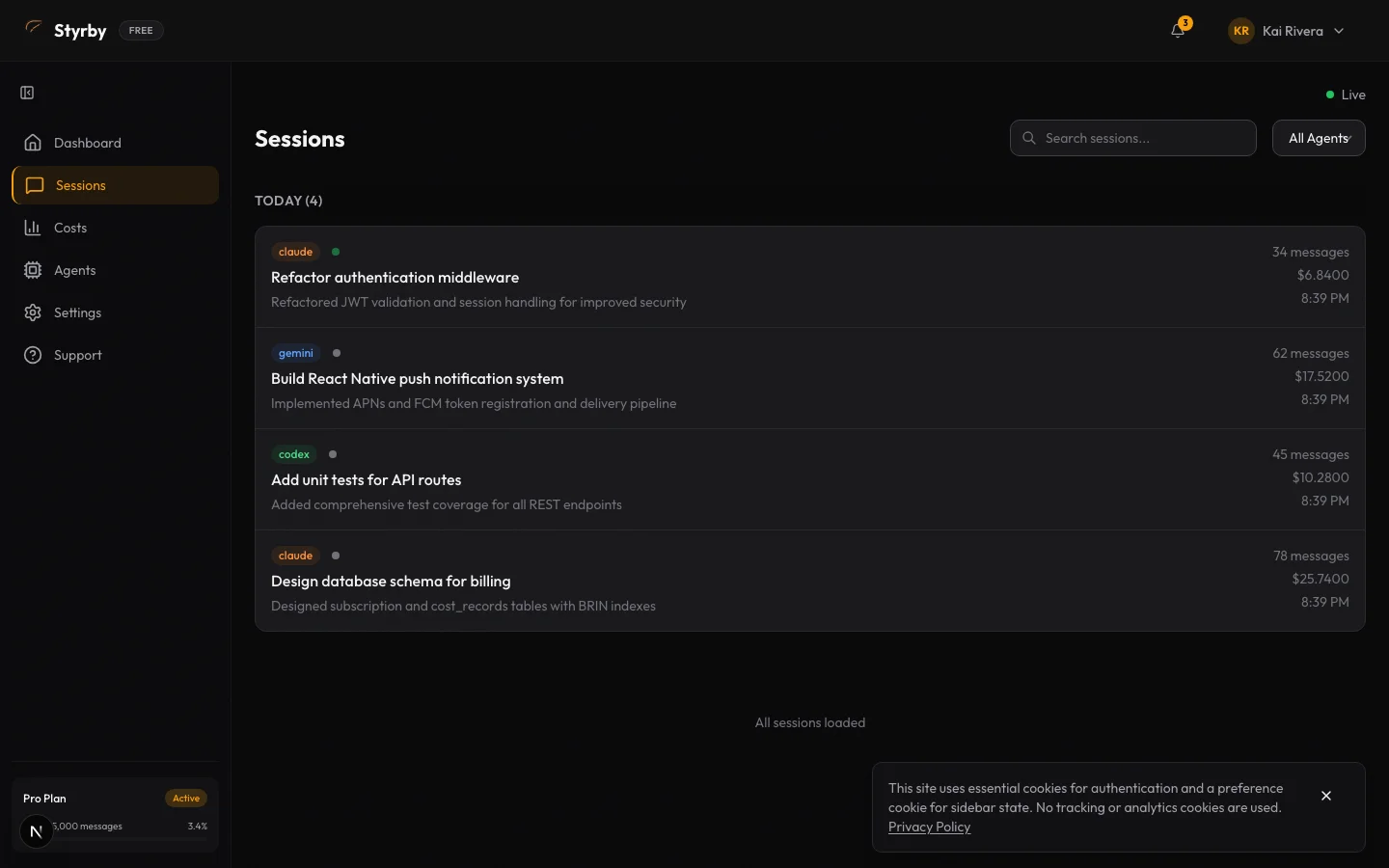
See the rogue session before the invoice. Cap the spend before it lands.
Cost Tracking Across Every Agent
Spending broken down per agent, per session, per model, per tag. Tag a session by client or project and the dashboard rolls up totals automatically, ready to drop straight into an invoice. Daily trend charts surface the days you would otherwise have missed.
Materialized views for sub-second dashboard loads. Cost by Tag section shows total spend and session count per tag.
Per-Message Cost Tracking
Drill into a single session and see what each individual prompt cost. The expensive ones are now visible. Rewrite the prompt template, switch the model, or tighten the system message before the next thousand requests.
Available on Pro and Growth.
Per-File Context Breakdown
See which files the agent loaded into context and how much each one contributed to the token bill. The 200-line file you forgot to .gitignore stops costing you $0.50 every prompt.
Available on Pro and Growth.
Activity Graph
A GitHub-style heatmap of your agent activity. The pattern surfaces things you would not catch in a session list: the Friday afternoon spikes, the agent you only run on Tuesdays, the dead weeks where you forgot the tool exists.
Available on Pro and Growth.
Model-Level Breakdown
Compare what you are spending on Claude Opus vs Sonnet vs Haiku, GPT-4o vs o3-mini, Gemini Pro vs Flash. Input, output, and cache token totals side by side. Decide which model to default to per agent based on your actual usage.
Pricing reference table with last-verified dates.
Budget Alerts
Set a daily, weekly, or monthly cap. Choose the response: just notify you, throttle the agent, or kill the session outright. The choice is yours, but the runaway loop you forgot about no longer becomes a $400 invoice.
Free: 1 alert. Solo: 5 alerts. Team and above: unlimited.
Multi-Agent Dashboard
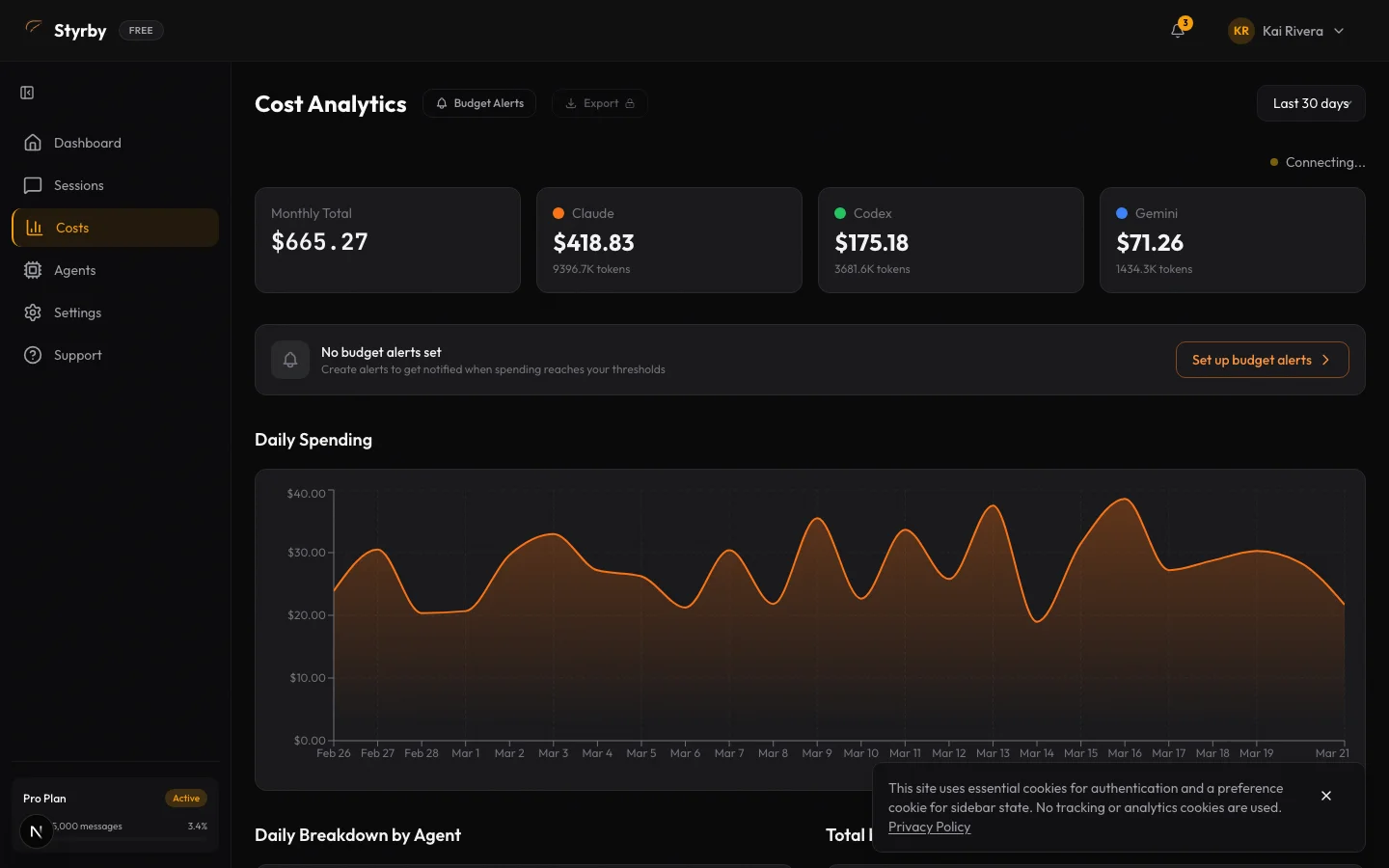
All 11 agents in one live view. No more grepping the API dashboard for which session broke.
Unified Agent View
All eleven agents on one screen. Color-coded status cards (active, idle, stuck, failing) tell you at a glance which ones need attention and which ones are doing their job. No more terminal tab roulette.
Real-time updates via Supabase Realtime subscriptions.
Error Attribution
When something breaks, the dashboard tells you whose fault it is. Color-coded by source: Styrby (orange), the agent itself (red), your build tools (blue), or the network (yellow). No more debugging the wrong layer.
Drill into error details from the dashboard.
Live Connection Status
Heartbeat monitoring for every connected machine, updated in real time. The moment a device drops offline or an agent stops responding, you see it. Reconnects happen automatically when the network comes back.
WebSocket-based with automatic reconnection.

Session History
Every prompt, every response, every tool call. Encrypted on your device. Searchable and resumable.
Searchable History
Filter your full session archive by agent, tag, date range, cost band, or full-text query against the metadata. Bookmark the sessions you want to come back to. Find the prompt that worked three weeks ago in seconds.
Free: 7 days. Solo: 1 year. Team and above: unlimited.
Session Replay
Step through the conversation in chronological order. Every prompt, every response, every tool call, every permission request. Decryption happens on your device. Use it for debugging, code review, or training a teammate on a workflow.
End-to-end encrypted. Decrypted only on your device.
Session Checkpoints
Drop a named bookmark inside a long session. Come back to that exact moment later, compare two checkpoints to see what changed, or share the specific point in the conversation where things went sideways.
Available on Pro and Growth.
Session Sharing
Generate a share link for any replay. The data stays end-to-end encrypted and the recipient needs a separate key that you give them out of band. Styrby itself never sees plaintext, even on shared sessions.
Available on Pro and Growth.
Per-Session Cost Breakdown
Drill into any session and see the cost broken down by input tokens, output tokens, cache hits, and model. Export to CSV when finance asks for the receipts.
CSV export available on Pro and Growth.
Notifications
Get the page when it matters. Stay quiet when it does not.
Push Notifications
Permission requests, budget alerts, errors, and session events land on your phone the moment they happen. Tap and respond in seconds. Beats refreshing a terminal every five minutes from the couch.
APNs (iOS) and FCM (Android) supported.
Quiet Hours
Define when you do not want to be paged. Critical alerts (budget breached, agent stuck) can punch through the quiet window if you want them to. Configurable per notification type.
Per-notification-type granularity.
Catch-up Digests
Walk into Monday already knowing what your AI did. No scrolling, no guessing.
On-Demand Session Summary
Open any session, hit summarize, get the rundown. What the agent worked on, the files it touched, what shipped, what got stuck. The "what did Claude even do for the last hour" answer, one tap away.
Available on Pro and Growth.
Weekly Digest, Sunday Morning
Coffee in hand, your inbox: a 3-sentence summary of the past week. 47 commits, the auth refactor landed Thursday, three sessions caught a regression you forgot to push. Walk into Monday with the picture loaded.
Available on Pro and Growth. Delivered Sunday at 9am Central.
Daily Digest, Before Your 9am
Every morning, the rundown of yesterday: what each developer's agents shipped, what stalled, what cost spiked. Open before standup, walk in with the picture already loaded. No more "wait, what did the team get done yesterday?" at 9:01.
Growth only. Delivered every morning at 8am Central, with team-wide rollup.
Pro Features
ProWhat you wire in once your team depends on agents in production.
Voice Commands
Talk to the agent when your hands are on the wheel, holding the kid, or carrying groceries up three flights. Approve, deny, dictate a prompt, kill a session. Voice transcript is logged alongside the rest of the session.
Available on Pro and Growth.
Cloud Monitoring
Kick off a long-running cloud job from the dashboard, watch its progress live, and get pushed when it finishes or fails. Stop opening five tabs to check whether the build is done.
Available on Pro and Growth.
Code Review From Mobile
Submit a review request, monitor it on your phone, leave inline comments, and get pushed the moment it finishes. The same review you would do at a desk, just without the desk.
Available on Pro and Growth.
OTEL Export
Stream session metrics, cost data, and trace events to whatever observability stack your platform team already runs: Grafana, Datadog, Honeycomb, New Relic. The agent activity becomes another service you can graph and alert on.
Available on Pro and Growth.
Rust Parser
A Rust-backed parser for session data, faster than the default JS parser and with a much lower memory footprint. The win shows up on long sessions and high-token replays. Available everywhere.
Available on all tiers.
Team Collaboration
GrowthEngineering managers see the cost. Developers keep the autonomy.
Team Members
Invite teammates by email. Each one gets their own login and role-based access: Owner, Admin, or Member. No shared credentials, no Slack-passed passwords, no audit gaps.
Team plan: 3-seat minimum. Invite flow with email verification.
Shared Dashboards
Everyone on the team sees the same cost analytics, session history, and live agent status, scoped to their role. Managers get the visibility they need. Developers keep the autonomy they want.
Row-level security ensures data isolation between teams.
REST API
Programmatic access to your session and cost data. Pipe it into a custom internal dashboard, a Slack daily summary, a CI gate that fails when an agent runs over budget. Whatever you can write a script for.
Authenticated with hashed API keys. Rate-limited.
Supported Agents
Pairs with the 11 CLI agents already in your terminal
Pair your first agent in under a minute.
Pro at $39/mo, Growth at $99/mo (3 seats included). Cancel anytime.